Real (RAG)-Based Chatbot Development: What You Get with a “Plugin Chatbot,” and Why It Pays to Build on Company Knowledge
Introduction (intro)
A chatbot plugin “dropped onto” a website can now be deployed in 10–30 minutes. And in many cases, that’s the whole point: have a chat bubble that answers something.
But the business value doesn’t come from the bubble—it comes from the bot working from your company’s real knowledge, correctly, securely, measurably, and optimized for conversion. And for that, a third-party plugin usually isn’t enough.
In this article, we’ll break down two things in depth:
- what real, RAG (Retrieval-Augmented Generation) chatbot development looks like in practice,
- what you typically get with plugin chatbot solutions—and where the limitations show up.
Throughout, we’ll focus on what decides most outcomes: accuracy, data security, control, measurability, scalability, and ROI.
If your goal is specifically lead generation and sales growth, it’s worth reading this too: AI chatbots integrated into websites: how they generate more leads and more sales (not more noise)
1) What is a “real” RAG chatbot, and how is it different from a basic LLM chat?
Most misunderstandings start with the fact that many people call anything that chats with an LLM (a ChatGPT-like model) a “chatbot.”
1.1. Basic LLM chat: fast, but blind from a business perspective
A basic LLM chat (e.g., a general assistant) by default:
- doesn’t know your internal processes,
- can’t see your product and price list (unless you paste it in manually),
- doesn’t know your latest shipping terms,
- and if it “guesses,” it does so very confidently.
This isn’t malicious—there’s simply no company knowledge layer behind it.
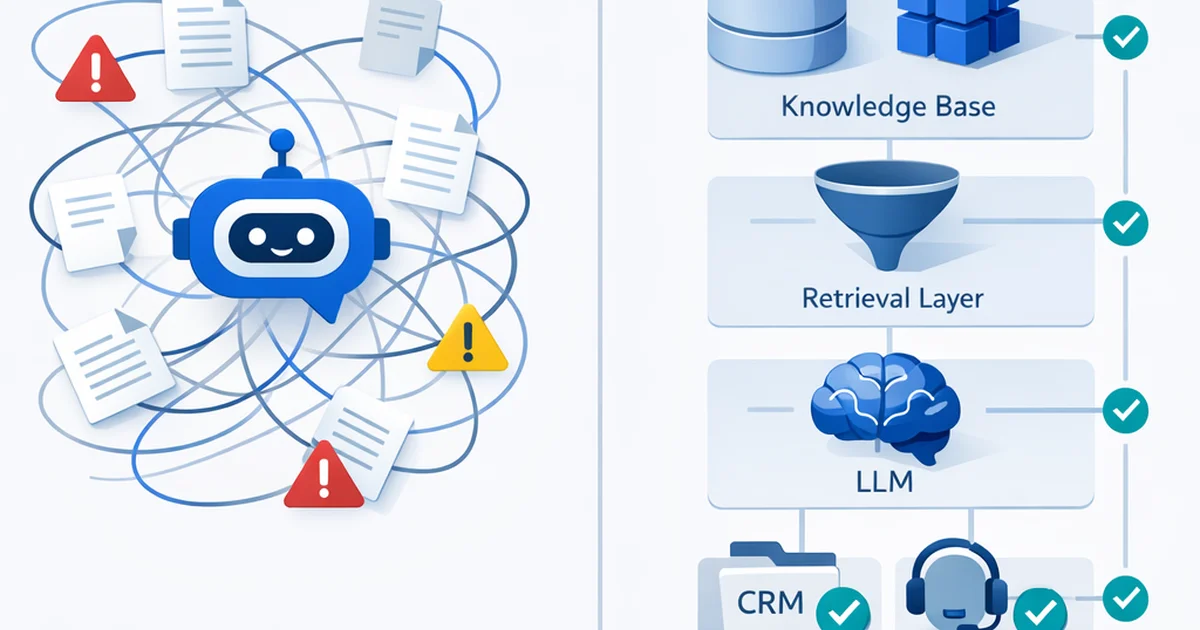
1.2. RAG (Retrieval-Augmented Generation): “ask → retrieve → answer”
The point of RAG is that the bot doesn’t try to wing it from memory. Instead it:
- interprets the question,
- retrieves relevant sources from the company knowledge base,
- generates an answer based on those sources,
- (ideally) cites the sources.
Result: fewer hallucinations, fresher information, and stronger business control.
1.3. Why “real” RAG? Because it’s not just dumping in PDFs
A “real” RAG chatbot typically doesn’t stop at uploading a few documents.
A solution that’s actually usable for business includes:
- knowledge base architecture (what’s the source of truth?),
- access management (who can see what?),
- versioning and updates (what’s the latest?),
- measurement and feedback loops (when does it get things wrong?),
- events and conversions (what does it drive commercially?),
- and often tool use / agent capabilities (e.g., checking order status).
RAG and organizational adoption of a knowledge base is its own topic, but it’s closely related: Knowledge Base in operations: how to embed it into the organization, and where it creates immediate business value
2) What do you get with most plugin chatbot solutions (and why is it tempting)?
Plugin chatbots (third-party widgets) spread because:
- they’re quick to install,
- they come with a ready-made UI,
- they have some kind of “upload a knowledge base” feature,
- and they often start cheap.
2.1. Typical plugin “knowledge”: crawl + PDF upload
Most plugins work something like this:
- you provide a few URLs to crawl,
- you upload 5–50 PDFs,
- and it “turns that into a bot.”
It’s fine for a demo. In production, the issues show up quickly.
2.2. The most common limitations (in real life)
1) Shallow retrieval
- Poor chunking (bad splitting → bad matches).
- Doesn’t handle synonyms/product variants well.
- Can’t reliably synthesize an answer from multiple sources.
2) Missing source management
- It’s unclear what it answered from.
- You can’t easily fix the “source of truth.”
3) Limited control over responses
- Hard to regulate tone, legal disclaimers, forbidden topics.
- Hard to implement “if you’re not sure, ask a clarifying question” logic.
4) Integration ceiling
- CRM, ticketing, order management, inventory, scheduling: often only at a Zapier level—or not at all.
- Yet real value is often that the bot can take action, not just talk.
5) Data security and compliance questions
- Where are conversations stored?
- Does it learn from them?
- What region does it run in?
- Who has access via the admin panel?
6) Vendor lock-in
- Your knowledge base and conversation logs get stuck with the provider.
- If you want to switch, you often have to rebuild everything.
2.3. When is a plugin still enough?
There are cases where a plugin is totally fine:
- a short campaign landing page,
- a very simple FAQ,
- a low-risk industry,
- no internal knowledge assets to structure,
- deep integrations aren’t a goal.
The trouble starts when you want to use the chatbot as a sales channel or the first line of customer support.
3) What does real RAG-based chatbot development look like? (end-to-end)
Here’s the key point: a company chatbot isn’t “a model”—it’s a system.
3.1. Step 0: goal and scope (otherwise the bot just talks)
Even the best RAG systems fail without a clear scope.
Typical goals:
- Lead generation (qualification, quote requests, booking)
- Customer support deflection (reducing tickets)
- Product selection support (configuration, comparison)
This is where you decide:
- what knowledge is needed,
- what integrations are needed,
- what the KPIs will be.
A useful framework for measurement and KPIs: How to measure AI SEO success? (KPIs in a zero-click world)
3.2. Step 1: map knowledge sources (assign the “source of truth”)
Company knowledge is usually scattered:
- website (marketing claims),
- Terms & Conditions, FAQ,
- internal SOPs, playbooks,
- product data (PIM/ERP),
- ticketing (real questions!),
- sales call notes.
With a “real” RAG chatbot, you define:
- the primary source of truth,
- what’s only supplemental,
- what’s forbidden.
3.3. Step 2: data prep (chunking, normalization, metadata)
Retrieval quality is 70% decided by data preparation.
What do we do here?
- Clean documents (PDF noise, duplicates)
- Split logically (chunking) by sections
- Metadata: product category, effective date, language, audience
- Versioning: what’s current vs. archived
A plugin often “chunks automatically,” but not according to your business logic.
3.4. Step 3: indexing (vector database + search strategy)
RAG typically uses vector search (embeddings), often combined with:
- keyword search (BM25),
- metadata filtering,
- reranking (reranker).
The goal: put the best 3–8 sources in front of the model, not 40.
If you want to go deeper on why the vector layer is foundational: What is a Vector Database and why will it become the new foundation of GEO?
3.5. Step 4: prompt and policy layer (how should the bot “behave”?)
This is the difference between “it answers” and “it’s a business assistant.”
Examples of settings:
- mandatory source citations
- if there isn’t enough info: ask a follow-up question
- forbidden topics (e.g., legal/medical advice)
- style: concise, to the point
- CTA: when to route to a quote request
Prompting isn’t magic—it’s specification: Prompt Engineering for SEOs: how to instruct AI for the best results
3.6. Step 5: tool use (tool calling) — when the bot can actually do things
This is where most companies see real ROI.
Examples:
- order status lookup (API)
- appointment booking
- building a cart
- creating a ticket (Zendesk/Jira)
- logging a lead in the CRM
With plugin chatbots, this is either unavailable or very limited.
3.7. Step 6: UI/UX and conversation design (it matters how you ask)
A good chatbot doesn’t just answer—it:
- clarifies intent quickly
- asks structured follow-ups
- provides buttons and quick replies
- knows when to hand off to a human
And yes: design and copy matter.
3.8. Step 7: measurement, QA, continuous improvement (the model doesn’t learn—the system does)
In a live system, you need to measure:
- retrieval accuracy (does it bring the right sources?)
- answer quality (is it correct and complete?)
- escalation rate (when does it need a human?)
- conversion (lead, purchase, booking)
- top questions (content gaps)
“Training” here is mostly:
- better chunking
- better metadata
- new FAQ entries
- policy refinement
- improved tool flows
4) Why aren’t third-party plugin bots advantageous long term? (business and technical reasons)
4.1. Not optimized for your business logic
A plugin aims to be “good for everyone.” Your company needs:
- the bot to configure your product correctly,
- handle objections,
- qualify leads,
- and communicate according to your internal rules.
4.2. Limited customization = limited conversion
Conversion often comes from the small details:
- when does it ask for an email?
- when does it share a quote request link?
- how does it handle “I don’t understand”?
If you don’t have deep control over these, the bot is “nice,” but it doesn’t produce results.
4.3. Data and reputational risk
A hallucination in customer support:
- misroutes a complaint,
- gives incorrect shipping info,
- quotes the wrong price,
- or gives legally problematic advice.
Sourced RAG and a policy layer reduce this risk.
A detailed look at risks and ethics: The dark side of AI SEO: hallucinations, penalties, and ethical questions
4.4. Your knowledge base is a strategic asset—you don’t want to outsource it
A good knowledge base:
- reduces support costs,
- speeds up sales,
- standardizes communication,
- and later becomes the foundation for other AI use cases.
If it lives inside a plugin’s admin UI, it’s harder to integrate and improve.
5) Decision framework: when to use a plugin vs. real RAG development?
5.1. Choose a plugin if…
- you need something “good enough” in 1–2 weeks
- the risk of wrong answers is low
- you don’t need CRM/ticketing/API integrations
- the knowledge base is small and rarely changes
5.2. Build a real RAG chatbot if…
- the bot is a customer support or sales channel
- there are many product variants / the decision is complex
- knowledge changes often (prices, inventory, processes)
- compliance and access control matter
- you want to optimize conversion measurably
5.3. Hybrid path: quick plugin → then migrate
A common strategy:
- use a plugin as an MVP (learn from the questions),
- then build a RAG system based on the top questions and integration needs.
Key point: plan for future migration from day one (data export, logs, knowledge base structure).
Conclusion
A chatbot isn’t “good” because it can talk—it’s good because it delivers correct, verifiable, secure answers grounded in your company’s real knowledge, while also supporting business processes (lead, booking, ticket, order).
Third-party plugin chatbots offer a fast entry point, but long term they often hit the same walls: limited control, limited integrations, questionable data handling, and business impact that’s hard to measure.
Building a real RAG-based chatbot is more work—but in return you get a scalable, measurable system optimized for your operations, not a generic widget.
FAQ
What’s the biggest difference between a RAG chatbot and a “I upload a few PDFs” plugin?
With a RAG chatbot, the knowledge layer, retrieval quality (chunking, metadata, reranking), policies (what it can say/when it should ask follow-ups), integrations, and measurement work together as a system. A plugin often provides generic, limited retrieval with little control and little production-grade feedback.
How long does real RAG chatbot development take?
A focused MVP (1–2 use cases, limited knowledge base, basic measurement) is often 3–6 weeks. A more mature system with multiple integrations and permissioning can take 2–4 months—especially if your knowledge sources are messy.
What should you pay the most attention to from a data security perspective?
Where conversations and the knowledge base are stored, who can access them, whether you can choose a region, whether PII masking exists, what the retention policy is, and whether the model/training uses your data. In an enterprise environment, role-based access and audit logs are often required as well.
How can hallucinations be reduced?
Strong retrieval (high-quality chunking + metadata + reranking), source enforcement (only claims supported by documents), follow-up questions when uncertain, handling forbidden topics, and ongoing QA based on real conversations.
What KPIs should you use to measure chatbot success?
Typically: resolution rate (share of conversations solved), escalation rate (handoff to humans), lead/purchase/booking conversion, CSAT, top questions and content gaps, plus retrieval accuracy (share of relevant sources returned).
Enjoyed this article?
Don't miss the latest AI SEO strategies. Check out our services!